Improvements #
Enhanced Bulk Status Updates #
We are excited to announce a major usability enhancement to the Bulk Action workflow. Previously, updating the status of multiple orders required mandatory inputs—such as weight, warehouse, or reasons—regardless of whether those values already existed in the system. This often slowed down operations, especially during high-volume processing.
With this update, users now have the flexibility to bypass these mandatory fields when needed, speeding up bulk updates without compromising data integrity.
🔑 Key Improvements #
✔ Bypass Mandatory Fields #
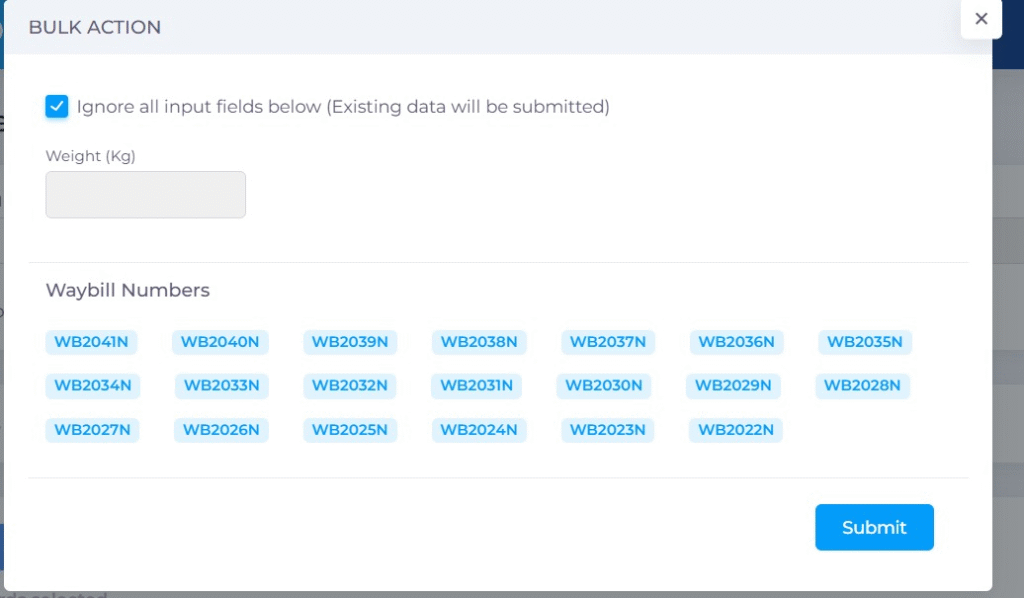
A new “Ignore Input” checkbox has been added to the Bulk Action popup.
When selected, the system automatically disables the input fields related to that status (e.g., Weight, Warehouse, Reason).
✔ Use Existing Order Data #
If you choose to skip the inputs, the system will proceed using the existing values already stored in each order record.
✔ More Flexible Workflow #
Users can now:
- Enter new values manually OR
- Skip the fields entirely with one click
This ensures faster processing for bulk operations, especially when values don’t need to be overridden.
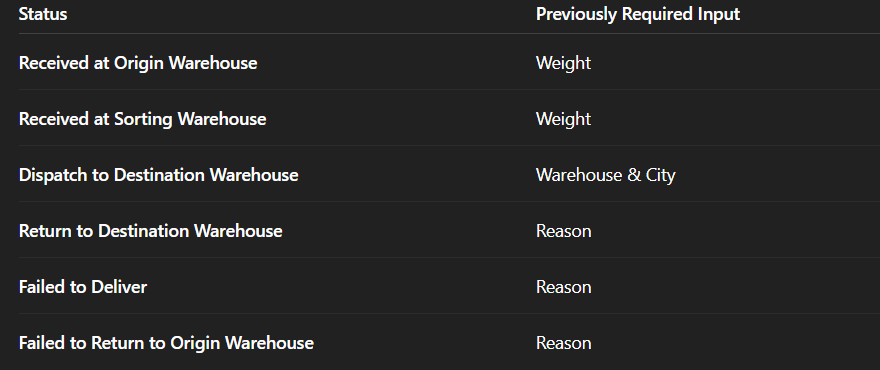
📌 Supported Statuses #
This feature applies to the following bulk operations:
🛠️ How to Use the Feature #
- Select the orders you want to update.
- Click Bulk Action.
- In the popup, locate the “Ignore / Skip Input” checkbox above the input fields.
- Tick the checkbox to disable the fields.
- Submit the update.
- The system will update the status while preserving each order’s existing data for the skipped fields.
This enhancement significantly improves efficiency when handling large batches of orders—saving time and reducing repetitive data entry.


