Skip to content

Curfox Docs

Curfox Docs

Back to Web

🚚 Release Note: New Dispatch Reporting Module

Home🚚 Release Note: New Dispatch Reporting Module

RELEASE NOTES

41
  • Pre Release Note V3.33.0
  • Release Note V3.32.0
  • Release Note V3.31.0
  • Release Note V3.30.0
  • Release Note V3.29.0
  • Release Note V3.28.0
  • Release Note V3.27.0
  • Release Note V3.26.0
  • Release Note V3.25.0
  • Release Note V3.24.0
  • LOGIN AND START THE JOURNEY WITH CURFOX
  • Introduction to Curfox
  • What Intricate Ecosystems Thrive Along the Banks of Rivers?
  • πŸš€ New Feature Release: Billing City Override Setting
  • πŸš€ Enhanced SMS Notifications for Rescheduled Deliveries
  • πŸš€Bypass ‘Dispatch from Origin Warehouse’ Status for Invalid Destination Cases
  • πŸš€Sorting History for Enhanced Tracking
  • πŸš€Enhanced SMS Provider Configuration
  • πŸš€Rate Card Approval Option – Phase 1
  • πŸš€Warehouse Sorting Device Management
  • πŸš€WhatsApp Messaging Integration
  • πŸš€Proof Upload Feature
  • πŸš€Filter Saving Option
  • Pre Release Note – V3.38.0.14
  • πŸš€ Pre Release Note – V3.38.11
  • Pre Release Note V3.38.0.13
  • πŸš€ Release Note : Add Redelivery Flag for Failed to Deliver
  • Release Note : New Curfox Rider App
  • Release Note 3.38.0.12
  • Release Note – 3.38.10
  • Release Note 3.38.0.10
  • πŸ“Œ Release Note: Redelivery Flag for Verify Failed to Deliver
  • Release 3.38.07
  • Release 3.38.08
  • 🚚 Release Note: New Dispatch Reporting Module
  • Release Note V3.38.0.6
  • πŸš€ Flag Management Feature
  • πŸš€New Status for Status Flow “Verify Failed to Deliver”
  • πŸš€ Image Scan Upload
  • πŸš€Geofencing Module
  • Release Note V3.38.6

RIDER APP

2
  • User Guide
  • Release Note : New Curfox Rider App

LOCAL RELEASE NOTES

8
  • Pre Release Note – V3.38.0.14
  • Pre Release Note V3.38.0.13
  • πŸš€ Release Note : Add Redelivery Flag for Failed to Deliver
  • Release Note : New Curfox Rider App
  • Release Note 3.38.0.12
  • πŸ“Œ Release Note: Redelivery Flag for Verify Failed to Deliver
  • Release Note 3.38.0.10
  • πŸš€ Pre-Deposit Merchant Invoice Approval Process

INTERNATIONAL RELEASE NOTES

2
  • πŸš€ Pre Release Note – V3.38.11
  • Release Note – 3.38.10

MERCHANT PORTAL

1
  • LOGIN AND START THE JOURNEY WITH CURFOX

STAFF PORTAL

1
  • LOGIN AND START THE JOURNEY WITH CURFOX

OVERVIEW

1
  • Introduction to Curfox

USER GUIDES

1
  • πŸ“šUser Guide: WhatsApp Message API Setup
View Categories
  • Home
  • Docs
  • RELEASE NOTES
  • 🚚 Release Note: New Dispatch Reporting Module

🚚 Release Note: New Dispatch Reporting Module

2 min read

We are excited to introduce the Dispatch Reporting feature within the Sorting Module.
This enhancement is specifically designed to boost outbound logistics accuracy, ensuring every bag and parcel leaving the warehouse is correctly accounted for before being loaded into delivery vehicles.

This feature creates a direct comparison between system data and physical inventory, helping operations teams identify missing or mismatched items instantlyβ€”before the vehicle leaves the premises.


πŸ› οΈ Key Features #

βœ… 1. Accurate Bag Verification #

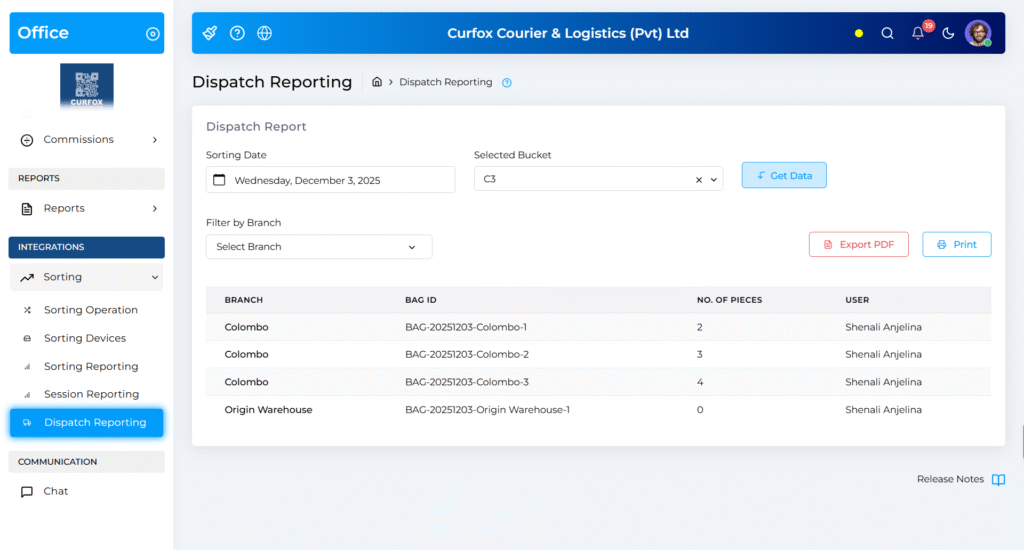
You can now generate a Bucket-Wise Dispatch Report that shows the expected number of bags in the system for a specific route or bucket.

  • If the system shows 10 bags, the team can verify that all 10 bags are physically available.
  • This prevents errors such as short-shipping, one of the most common dispatch issues.

πŸ“¦ 2. Parcel Count Visibility Inside Each Bag #

To provide deeper operational accuracy, the Dispatch Report now includes Parcel Count per Bag.

  • Each bag displays its bag number and total parcels inside.
  • Ensures that not only the bag is present, but its contents match the manifest.
  • Helps detect scenarios like missing parcels, incomplete bags, or wrong bag routing.

🎯 3. Advanced Filtering Options #

You can precisely retrieve dispatch data using the following filters:

  • Sorting Date – Filter the dispatch operation by date
  • Selected Bucket – Choose Master Buckets or derived buckets
    (e.g., A, A1, B, B1)
  • Enables quick isolation of dispatch loads for specific routes or destinations

🌟 Benefits #

πŸ›‘οΈ Loss Prevention #

Reduces the risk of:

  • Bags being left behind at the warehouse
  • Bags getting misplaced during handover
  • Incorrect routing of bags

⚑ Operational Efficiency #

  • Eliminates manual counting
  • Reduces human errors
  • Speeds up the dispatch verification process

πŸ“Š Data Integrity #

  • Ensures a perfect match between physical dispatch and system records
  • Supports compliance and audit requirements

πŸ“ How to Use #

  1. Navigate to Integrations from the sidebar menu
  2. Select Sorting
  3. Click Dispatch Reporting
  4. Use the dashboard:
    • Pick a Sorting Date
    • Select a Bucket
    • Click Get Data
  5. Review the generated report for total bags and parcel counts
Updated on December 3, 2025

What are your Feelings

  • Happy
  • Normal
  • Sad

Share This Article :

  • Facebook
  • X
  • LinkedIn
  • Pinterest
Release 3.38.08Release Note V3.38.0.6

Powered by BetterDocs

Leave a Reply Cancel reply

Your email address will not be published. Required fields are marked *

Table of Contents
  • πŸ› οΈ Key Features
    • βœ… 1. Accurate Bag Verification
    • πŸ“¦ 2. Parcel Count Visibility Inside Each Bag
    • 🎯 3. Advanced Filtering Options
  • 🌟 Benefits
    • πŸ›‘οΈ Loss Prevention
    • ⚑ Operational Efficiency
    • πŸ“Š Data Integrity
  • πŸ“ How to Use

Β© 2025 Curfox Docs - All Rights Reserved Parallax Technologies